
Short answer: Build your 2027 Dallas service business budget from your latest closed books, signed work, realistic sales estimates, and the staff you’ll have to deliver. Plan revenue and expenses by month, and map when cash will come in and go out. After each monthly close, run a budget-to-actual report, explain the gaps that affect profit or cash, and assign an owner and a deadline for each action.
Key takeaways
- Build revenue from contracts, capacity, and rates. Put the work in the months you expect to deliver it.
- Separate the cost of serving clients from overhead so you can see what each sales dollar contributes.
- Compare the closed month and year to date against the approved budget. Check cash and upcoming commitments alongside profit.
- Keep the original budget as your benchmark. Update your forecast when new information changes what you expect for the rest of the year.
What should we pull together before building the 2027 budget?
Start with the latest closed monthly Profit & Loss, Balance Sheet, and Statement of Cash Flows. Use the Profit & Loss to see what you earned and spent, the Balance Sheet to see what customers owe and what you owe, and the Statement of Cash Flows to see why your cash balance moved. Ask your bookkeeper for the monthly financial reports your bookkeeper should send if you need help finding the starting figures.
Look at 2026 month by month. Flag unusual items such as a large project that ended, an office move, or contractor coverage during a vacancy. Use the latest closed month as your cutoff and estimate any remaining months separately. That gives you a baseline you can trace back to the books when an assumption gets challenged.
Gather signed agreements, renewal dates, current rates, payroll commitments, and planned vendor changes. Next to each major budget assumption, record what supports it, who owns it, and when it might change. For a Dallas agency, that could mean flagging a retainer renewal before committing to a hire. For a Richardson practice group, it could mean budgeting each location before combining the results so you can see which location is driving a change.
How do we turn those records into a realistic monthly budget?
Build sales from work you can deliver. List recurring contracts in the months you expect to serve each client. For projects, use start dates, delivery schedules, and expected rates. Keep unsigned work visible as a separate assumption and use your own sales history to judge how much belongs in the base case. Check the combined workload against staff and contractor availability.
Budget the cost of doing the work. Estimate delivery payroll and related employer costs, subcontractors, and project expenses. Use your current team, hiring dates, and expected hours. If fees are fixed but labor varies with scope, estimate the hours needed to deliver. Comparing the fee with the full delivery cost helps you find your real margins.
Put overhead in the months it belongs. Use lease terms, renewal dates, and vendor agreements for rent, insurance, software, and other recurring costs. Include administrative payroll separately if that matches how you review the business. Record planned increases when they will take effect so the monthly budget reflects the decisions already made.
Check seasonality against your own records. A North Texas ice event or a stretch of extreme heat can reschedule field work. A consulting firm may see a different pattern from client holidays or delayed approvals. Use your calendar and job history to estimate what can move, which costs keep running, and whether rescheduled work will fit into the following month.
Before approving the budget, look for months where your plan requires more billable work than your team can handle. Decide what you would change if that work lands as expected. Shifting a start date affects when you earn revenue. Adding a contractor affects the margin. Make the choice in the budget so the team has a plan before promising dates to clients.
What does a worked budget look like for a Dallas service firm?
Consider a fictional Dallas consulting firm with a $1.2 million annual revenue budget. Every dollar amount in the example and the monthly comparison below is illustrative. The firm expects $720,000 from retainers and $480,000 from projects. Its approved January revenue budget is $100,000 based on the work expected that month.
| Budget line | January | Full year | How to estimate it |
|---|---|---|---|
| Retainer revenue | $60,000 | $720,000 | Use contract fees, service dates, and supported renewal assumptions. |
| Project revenue | $40,000 | $480,000 | Schedule expected work by milestone and check delivery capacity. |
| Total revenue | $100,000 | $1,200,000 | Add retainer and project revenue. |
| Delivery payroll | $40,000 | $480,000 | Use staffing dates, compensation, and related employer costs. |
| Contractor and project costs | $10,000 | $120,000 | Use agreed rates and expected hours, plus other direct project costs. |
| Gross profit | $50,000 | $600,000 | Subtract delivery payroll and contractor and project costs from revenue. |
| Administrative payroll | $15,000 | $180,000 | Use the staffing plan for management and support roles. |
| Other overhead | $20,000 | $240,000 | Use leases, renewal schedules, and approved spending plans. |
| Operating profit | $15,000 | $180,000 | Subtract administrative payroll and other overhead from gross profit. |
January happens to match the firm’s average month in this simplified example. Build each of your remaining months from its own workload and costs, then add the months to get the annual totals. If a project moves, check whether its labor and contractor costs move with it.
Give cash its own schedule. Start with the opening bank balance, add expected receipts by collection date, and subtract expected payments by due date. Include payroll, vendor payments, equipment purchases, debt principal, and owner distributions where applicable. A profitable month can still leave the bank balance tight if customers pay after payroll or a major purchase comes due.
If the monthly cash schedule looks tight, a 13-week cash flow forecast can show which week needs attention. Track the date a client is likely to pay, then compare it with the dates your payments are due. That gives you time to follow up on a receivable or review the timing of a purchase.
How do we set up the budget-to-actual report in QuickBooks Online?
Match the budget to your accounts. Use the same income and expense categories you review on your Profit & Loss. If your planning worksheet groups several accounts into overhead, keep a record of which accounts are included. Put actual transactions and budget amounts on a consistent reporting basis so a difference in timing has a clear meaning.
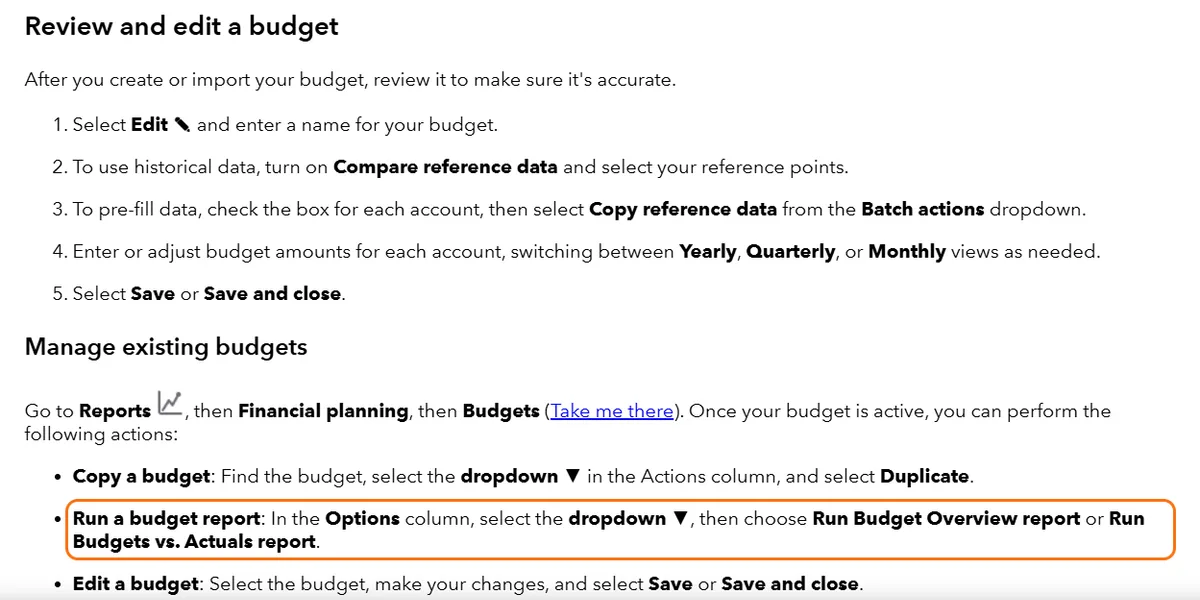
Save the approved monthly budget. In QuickBooks Online, go to Reports, then Financial planning, then Budgets, and select Create budget. Choose a Profit and loss budget and the right fiscal year, then enter the figures or import them from Intuit's Excel template. Check the monthly and annual totals, name the budget so everyone knows it is the approved 2027 version, and save it. Intuit's help page lists the feature for QuickBooks Online Plus and Advanced: Create budgets in QuickBooks Online.
Run the Budgets vs. Actuals report after the close. On the Budgets page, open the dropdown in the Options column next to your approved budget and choose Run Budgets vs. Actuals report. Set it to the month you just closed, then run a year-to-date view through the same month. Confirm the actual column matches your closed Profit & Loss for the same period before anyone reads the differences.
How can we tell whether we’re on track after each close?
Schedule the review when your books are ready. Many growing service businesses aim to close by about the 10th business day of the following month. Well-organized teams often close in 5 to 7 business days. Use a month-end close checklist to confirm that accounts are reconciled and items such as payroll, invoices, and bills are recorded in the right period.
Read the month and year to date together. Start with revenue, gross profit, and operating profit. Then review cash and upcoming payments. The month shows where to investigate. The year-to-date view shows whether the gap is accumulating or a prior timing difference has caught up.
Find out what moved. For revenue, look for changes in volume, rates, client mix, and delivery dates. For costs, check hours, vendor rates, purchase timing, and account coding. Ask the person who owns the work to confirm the cause before adjusting the plan.
Record the decision and follow up. Log the variance, its cause, your next action, the owner, and the due date. Agree in advance which dollar gaps trigger investigation, and pay attention to smaller gaps that repeat or threaten cash. Open the next review by checking whether the prior action resolved the issue.
| Line | Budget | Actual | Actual minus budget | What to do |
|---|---|---|---|---|
| Retainer revenue | $60,000 | $60,000 | $0 | Check upcoming renewals and keep the current revenue assumption. |
| Project revenue | $40,000 | $30,000 | −$10,000 | Confirm whether delayed work has a new delivery date. |
| Total revenue | $100,000 | $90,000 | −$10,000 | Check the revised invoice and collection dates. |
| Delivery payroll | $40,000 | $40,000 | $0 | Check whether available staff can cover the moved project. |
| Contractor and project costs | $10,000 | $8,000 | −$2,000 | Check whether costs shifted with the work or were truly avoided. |
| Gross profit | $50,000 | $42,000 | −$8,000 | Review the project’s remaining delivery costs. |
| Administrative payroll | $15,000 | $15,000 | $0 | Carry the current staffing assumptions forward. |
| Other overhead | $20,000 | $21,000 | +$1,000 | Check whether the extra charge will recur. |
| Operating profit | $15,000 | $6,000 | −$9,000 | Update near-term cash expectations and confirm when the work can be completed. |
The firm missed its operating profit budget by $9,000. Its $2,000 reduction in contractor and project costs partly offset the revenue gap, but those costs may return when the project resumes. The positive $1,000 overhead variance means spending ran above budget because this table subtracts budget from actual on every row.
Which mistakes hide a real problem, and when should we reforecast?
Treating delayed work as recovered revenue. Confirm that the client agreed to a revised date and your team can deliver alongside its existing commitments. If the client cut scope or canceled the project, lower the forecast and revisit the costs you can still change. If it’s a delay, update the delivery and cash dates even when you still expect the same annual revenue.
Celebrating underspending before checking what caused it. Lower labor spending can come from a vacancy that also limits how much you can bill. Lower vendor spending can come from a late invoice. Check for missing bills and compare the expense with the work delivered before counting the variance as savings.
Overwriting the approved budget. Keep the original budget for performance reviews. Reforecast when new information changes expected results or the decisions you need to make. A lost retainer, a confirmed rate increase, a changed hiring date, or recurring margin pressure can all change the outlook. Combine closed-month actuals with revised estimates for the open months, then update the cash schedule.
In the consulting example, a confirmed delay changes the monthly outlook even if the full-year target still holds. If the client cuts scope, the firm should compare the revised profit and cash projections under different staffing or spending decisions. Document what changed and what would make you revisit the decision so the next review can test the assumption.
When does it make sense to get LUCI’s help?
Most financial professionals give you reports. We give you answers. We work primarily with established service businesses, typically at $250K or more in annual revenue. From our Dallas–Fort Worth base, we work virtually through secure cloud-based systems with firms in Dallas, Plano, Frisco, Richardson, and nationwide.
Core includes monthly bookkeeping, reconciliations, senior review, and monthly financial reporting. Growth adds budget-to-actual reporting, custom reports, cash flow visibility, financial observations and recommendations, and quarterly financial review meetings. If your team wants a monthly comparison it can use to follow up on missed targets, Growth is the level to discuss. See how our financial reporting for Dallas businesses works month to month.
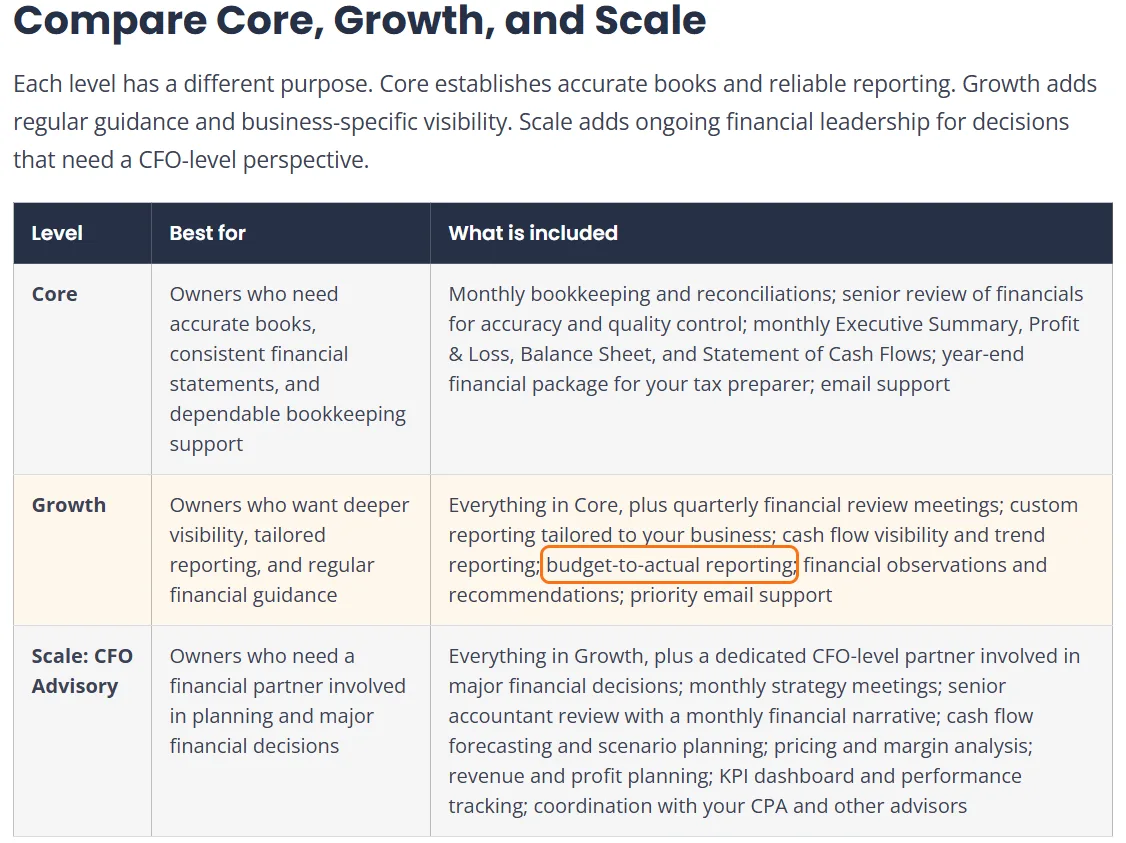
Scale adds a dedicated CFO-level partner, monthly strategy meetings, revenue and profit planning, cash flow forecasting, and scenario planning. It fits decisions such as whether a hire is affordable under a slower sales forecast or how a rate change could affect margin. We set a fixed monthly fee after a discovery call and put it in your proposal. Explore our fractional CFO services in Dallas and Core, Growth and Scale pricing.
Schedule a consultation on our contact page or call 214-233-5454. If you want to start with the condition of your books, our $597 Financial Review & Assessment includes a 60-minute review of your QuickBooks file and a prioritized action plan you keep.
Frequently asked questions
Can we build a budget before all of 2026 is closed?
Yes. Use closed months as your starting point and label the remaining 2026 figures as estimates. Check those estimates against the final results when the books close.
What’s the difference between a budget and a forecast?
A budget is the approved plan you use to measure performance. A forecast combines actual results with updated estimates to show where the year is likely to end.
What does a negative variance mean?
When your report subtracts budget from actual, a negative number means actual was below budget. On a revenue line it shows a shortfall, while on an expense line it shows spending below plan.
When should we review budget versus actual?
Review it after each monthly close, when reconciliations and transaction reviews are complete. Use both the closed month and the year-to-date period through that month.
Is budget-to-actual reporting included in LUCI’s Growth plan?
Yes. Growth adds budget-to-actual reporting and quarterly financial review meetings to the monthly bookkeeping and reporting included in Core. Scale includes it too, along with revenue and profit planning.
Do we need to visit LUCI’s office to get started?
No. We are based in Dallas–Fort Worth and work virtually with clients nationwide through secure cloud-based systems. Onboarding typically takes 2 to 4 weeks.
Ready to build a 2027 budget you can use every month?
Bring your most recent closed month and one decision you need the 2027 numbers to support. We can discuss what your reports need to show before you commit to a hire, change your prices, or take on more work. For a quick first step, take the free 7-question Financial Operations Assessment.